Push It: Building My Own Fitness App for the Bangle.js

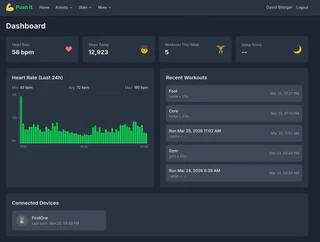
In a previous post, I wrote about choosing the Bangle.js 2 as my smartwatch because of data ownership. I promised a follow-up on how I built my own fitness app. Here it is.
How It Started
I was doing Freeletics and feeling motivated. Then I got a cheap gym membership for a month. Problem: Freeletics doesn’t really track weighted exercises. I needed something else.
I tried wger, an open-source workout tracker. I also started logging my weight there. But wger’s mobile UI is clunky, and half the time you can’t find the exercises you want. It worked, but it wasn’t great.
Around the same time, I wanted to start running. For that, I wanted a watch to track my progress. But I also wanted to own my data - no Garmin cloud, no Strava owning my routes. That’s when I found the Bangle.js 2.
The Bangle.js is very bare bones. But it runs JavaScript, and I’m a developer. So I thought: why not build my own platform?
The Tech Stack
- Laravel 12 - PHP backend with Inertia.js
- Vue 3 - Frontend with Composition API
- TailwindCSS - Dark theme UI
- PostgreSQL - Database
- Leaflet - Maps for run visualization
The app is called Push It - because that’s what you do when it gets hard.
Building It: Watch Connection First
I started with the watch connection. The Bangle.js runs JavaScript, so I wrote a custom app that collects GPS points, heart rate, and steps, then syncs via HTTP.
Device Registration
You register a device in the web UI, which generates a 64-character API token:
$device = $request->user()->devices()->create([
    'name' => $validated['name'],
    'api_token' => Str::random(64),
]);
Configure this token on the watch. On first sync, the watch sends its hardware ID, linking it to your account.
The Sync Protocol
The watch sends a JSON payload with metrics and GPS tracks:
{
  "device_id": "Bangle.js abc123",
  "metrics": [
    { "timestamp": 1711234567000, "hr": 72, "steps": 150 }
  ],
  "gps_tracks": [
    {
      "id": 1,
      "started": 1711234500000,
      "ended": 1711236000000,
      "points": [
        { "ts": 1711234500000, "lat": 47.123, "lon": 8.456, "alt": 450 }
      ]
    }
  ]
}
The server validates everything and handles duplicates by checking timestamps before inserting. This way, if a sync partially fails and retries, you don’t get duplicate data.
CI/CD From Day One
I published the app on my server early and set up GitLab CI/CD for auto-deployment. This meant I could push changes and test on my phone immediately. Essential for iterating quickly.
I also added a PWA manifest, so I could install Push It as an app on my phone. Feels native, launches from the home screen, no browser UI getting in the way.
The GPS Problem
It took a few attempts to get tracking working properly. The first problem: too many GPS points. The watch was recording points too frequently, and small GPS jitter added up to ridiculous distances. A 5km run would show as 100km.
The solution was the “Recalculate” button. It recomputes distance from the GPS points using the Haversine formula, filtering out the noise. Later I also added proper distance-based sampling for the elevation calculations.
Adding Features Over Time
Once basic run tracking worked, I kept adding:
- Map visualization - Route displayed on OpenStreetMap via Leaflet
- Elevation profile - Chart showing altitude changes during the run
- Heart rate graph - HRM data overlaid on the run timeline
- Splits - Pace per kilometer with visual bars
The heart rate from the watch wasn’t great during runs - wrist-based HRM struggles when you’re moving. I eventually bought a Polar H9 chest strap, which improved things significantly. The watch still records HR, but for serious runs I use the chest strap.
Migrating from wger
wger was getting on my nerves. The UI, the missing exercises, the general clunkiness. Time to move everything to Push It.
First, I added weight tracking. Simple feature - log your weight daily, see a chart over time. I still do this every morning. Then I wrote a migration script to import all my weight history from wger. No data left behind.
After that, I built the routine system.
Creating Routines
A routine is a sequence of exercises with:
- Sets and reps (or duration for timed exercises like planks)
- Weight (for gym exercises)
- Rest periods between sets
- Exercise images/GIFs for reference
- Two-sided flag (for exercises like side planks)
The Player
The killer feature is the workout player - execute routines like you do in Freeletics:
- Exercise display - Current exercise with image, reps/duration, and weight
- Preparation countdown - 5 seconds with beeps before timed exercises
- Timer - For duration-based exercises, with countdown for the last 5 seconds
- Rest timer - Circular progress between sets
- Audio cues - Beeps, completion sounds, even voice countdown
The interface is designed for the gym - big buttons, clear typography, works when you’re sweating.
Adjusting on the Fly
During a workout, you can:
- Adjust reps/weight/duration for the current set
- Add extra sets if you’re feeling strong
- Skip sets or exercises if something hurts
- Save changes back to the routine
That last one is key. Increase the weight on bench press, tap “Save to Routine”, and next week starts with that weight.
Resume Feature
If you exit mid-workout, progress is saved to localStorage. Come back within an hour and you can resume exactly where you left off.
Little by Little
The player didn’t ship with all these features. I built it little by little:
- First version: just showed the exercise and a “Done” button
- Then I added the timer for timed exercises
- Then rest periods between sets
- Then audio feedback
- Then the adjust controls
- Then the resume feature
Each addition came when I actually needed it during a workout. Now it feels pretty solid.
What’s Next: Machine Learning
The data is accumulating. Every workout, every run, every heart rate reading. This opens up possibilities:
- Progress prediction - When will I hit my next PR?
- Fatigue detection - HR patterns suggesting I need rest
- Routine optimization - Which combinations lead to best gains?
- Anomaly detection - Alert when something looks off
Having the raw data under my control makes this possible. With cloud services, you’re limited to whatever analytics they expose.
Lessons Learned
1. Start with what you need. Watch connection first, because that was the core problem. Routines came later when wger frustrated me enough.
2. Iterate in production. CI/CD from day one meant I could test real workouts immediately. Found problems faster that way.
3. Build for yourself. I’m not trying to compete with Strava or Freeletics. I just needed something that works for me. That freedom to be opinionated made development faster.
In future posts: Elevation correction with DEM data, Grade Adjusted Pace for hilly runs, and the stats dashboard.
