Bangle.js 2: A Smartwatch for Data Owners

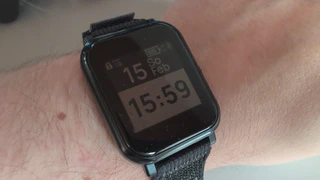
Last September, I started working out again. First Freeletics, then the gym, and eventually some runs. For running, I wanted a watch - but one where my data actually belongs to me.
Why Data Ownership Matters
Keeping my data under my control is important to me. Given everything happening in the world, I want to know exactly what happens with my data. Fitness data is personal: where I run, my heart rate, when I sleep.
I looked at several alternatives, especially Garmin. Unfortunately, Garmin offers no way to function without their cloud. The other major vendors are all heavily integrated into their clouds and therefore not trustworthy to me.
The solution: The Bangle.js 2 - an open-source smartwatch that you can fully control yourself.
Setup: WebBluetooth and Gadgetbridge
The setup is interesting and somewhat technical. The watch has its own “App Store” in the browser that works via WebBluetooth. I first had to enable a feature in Chrome/Brave to even connect. After that, you can do everything in the web interface - install apps, change settings, even upload your own code.
On Android, I use Gadgetbridge as the companion app. You need to install a connection app on the watch, then you can see data in the app. The app is okay, but I immediately turned off notifications - they annoyed me. The UI on the watch for this isn’t great either.
Important to know: You can export data, but a Recorder app needs to be installed and activated first. I didn’t know this at the beginning. My plan was to send data to my own web app anyway - which I later implemented (more on that in a future post).
Programmability
The best thing about the Bangle.js: It’s completely JavaScript-based. You can program it entirely yourself. I’ve made and tested several small apps. My ultimate goal is a custom tracking app that sends data directly to my server.
Daily Life with the Bangle.js 2
Battery: Actually quite okay. During runs it uses more due to GPS, but normally charging twice a week is enough.
GPS: I haven’t analyzed the data in detail yet. I use the Run+ app which uses GPS for pace calculations - that works well.
Heart Rate: The HRM isn’t very accurate during runs. Throughout the day, though, it’s actually reliable.
Apps I use:
- Run+ for running - shows pace, heart rate, etc.
- I also tried Sleep Monitor and a smart alarm that was supposed to wake me at the right sleep phase. I gave up on that.
- Otherwise, I mainly use the watch for telling time.
Hardware: I bought a Samsung band which is more comfortable than the original. Can recommend. For the price, the watch is very good.
Water Resistance: The watch is only rated as water-resistant, not waterproof. I accidentally went into my cold pool with it once - it survived. Got lucky!
Conclusion: Who is the Bangle.js for?
The watch is not for people who want everything to work out-of-the-box. You need time to set it up the way you want it. But once you reach that point, it’s actually great.
If data ownership matters to you and you’re willing to invest some time, the Bangle.js 2 is a real alternative to cloud-based mainstream watches.
Next post: How I built my own fitness app that communicates with the Bangle.js.
